Editing: exporting & publishing
Exporting
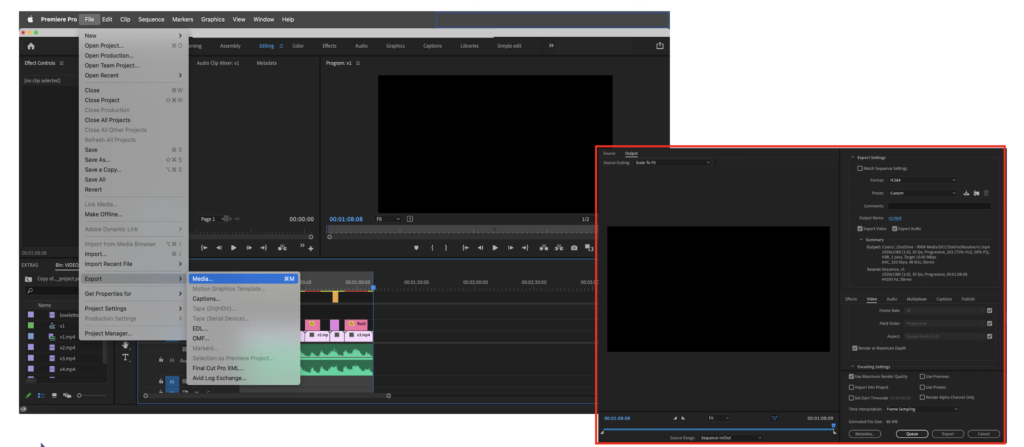
Exporting is the final step of the editing process. There are two main ways to go about it:
- Through Media Encoder: by cueing the exports Media Encoder workspace will appear and we can have more control over the different things we need to export. This option is very useful when exporting several clips with the same settings for the export, or when repurposing the content for different platforms.
- Quick export: when wanting to export a single sequence: File: Export: Media: Export.
For both cases it is important you answer two questions:
- What is the ideal technical format? In the option of Media Encoder, there are a series of presets that consider different social media platforms. Unfortunately, there are no options for vertical formats, so the aspect ratio needs to be configured in the editing process. Remember that by formats here we mean technical formats which are the different types of files software can produce, in the module on technical considerations we covered these options.
- Where do we want the files to be stored? This is important especially if we are working from an external hard drive or our own computer.
Publishing
Publishing is an important part of your creative process. It is the moment when all your work will become public, so thinking about how you want your content to be published is very important. You want this step also to be included in your engagement strategy. Here are a few things to consider when publishing:
Platforms
The first thing to know is that even when it might seem the right option, DO NOT post the same content across all your platforms. Most likely you have similar audiences across platforms and they might find your way of publishing content repetitive and boring. Especially considering social media strategy you want to show that you are producing content as a way of keeping conversations going, so you want to be as dynamic as possible. However, publishing similar content across platforms can be a great strategy if it is tailored to each platform. Think about it, you don’t consume content on IG the same way that you do on Facebook or Youtube. It can be as simple as tailoring the description text, the length of the video, or the technical format. Let’s see some of the main platforms to share content:

Facebook surpassed 2.6 billion users per month in 2020 and 1.85 billion people use Facebook every day. With numbers like this, there’s simply no denying its importance as a platform. As a platform it allows you to share diverse types of content, from text to video. It also offers the biggest reach of any platform, and easily lets you connect directly with audiences both publicly and privately. Best for: all content types, including text, images, and video. Best to use 16:9 aspect ratio for this platform.
The average watching time for audiences on this platform is of 10 seconds!

LinkedIn works a little differently from the majority of platforms listed here, as its focus is on corporate networking rather than engaging with customers. It’s still equally as valuable, however, as you can share your industry expertise and know-how using its blogging platform, as well as connect with other businesspeople to expand your network. Best for: publishing in-depth written content showing your industry knowledge.

This is a photo-sharing app, it has a more personal take and its content is usually more simple and shorter.
Instagram is doubly useful as it not only allows you to share images but written text to accompany them. Hashtags for example can help you increase your follower count and engagement.
Best for: image sharing and short videos. The aspect ratio is 1:1 or 9:16!
The average watching time for audiences on this platform is of 3 seconds!
YouTube

YouTube has more than 2 billion users, meaning you can’t pass up the opportunity to make the most of it. Whatever you are creating this platform allows for longer videos, so when thinking of engaging informational videos YouTube is an opportunity to put them on the screens of millions of potential audiences. Best for: sharing engaging and informative video content – it is the biggest video-sharing platform on the web after all! We recommend you stick to 16:9 aspect ratio!
The average watching time for audiences on this platform is of 1-8 minutes!
TikTok

New to the social media scene is TikTok, a video-sharing app popular amongst young audiences and their parents alike. It has 800 million active monthly users and has been downloaded over 2 billion times. Initially used to share lip-syncs and viral dances, its power is being harnessed by organisations to engage with audiences in a new and exciting way by sharing their own videos. You might consider this platform seriously especially if you want to reach younger audiences. Best for: creating fresh and light-hearted video content to engage your audience.
The average watching time for audiences on this platform is of 3 seconds!
Publishing time
We know that publishing is all about timing, especially when something is happening, let’s say a protest or a trending topic, its important you keep your audiences engaged by producing and publishing relevant and timely content.
Each social media platform has its own benefits and purposes which, depending on your goals, content type, and target audience, you might choose to focus on. Similarly, each platform has its own metrics but overall here is an overview of when is most useful to publish content:
- Best times to post on social media overall: Tuesdays through Thursdays at 9 a.m. or 10 a.m.
- Best days to post on social media: Tuesdays through Thursdays
- Worst days to post on social media: Sundays
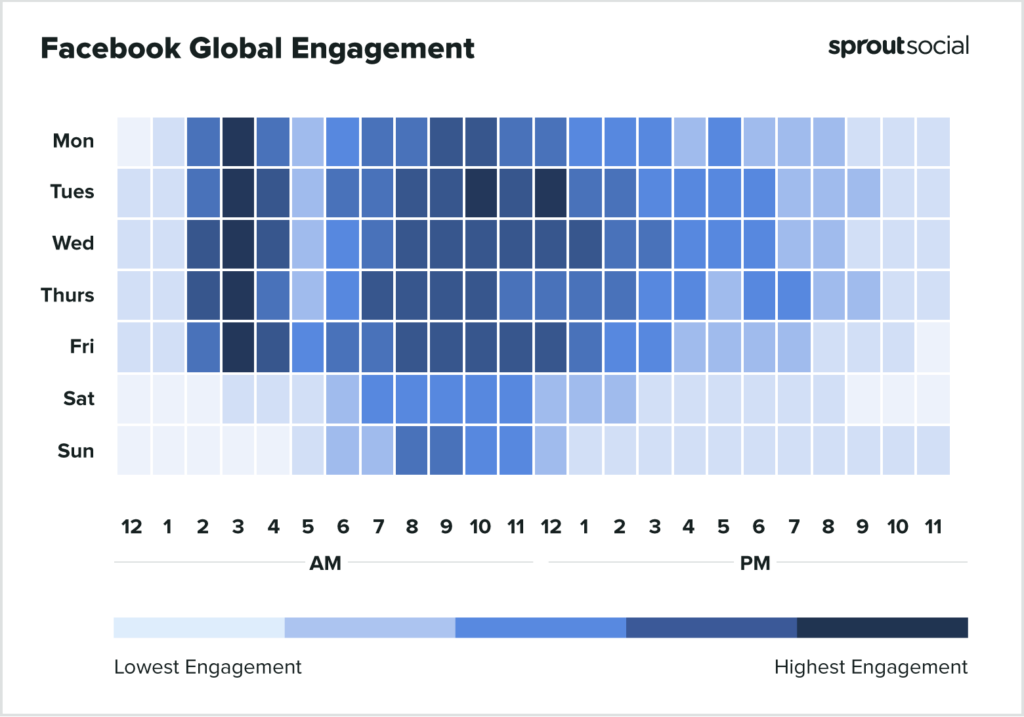
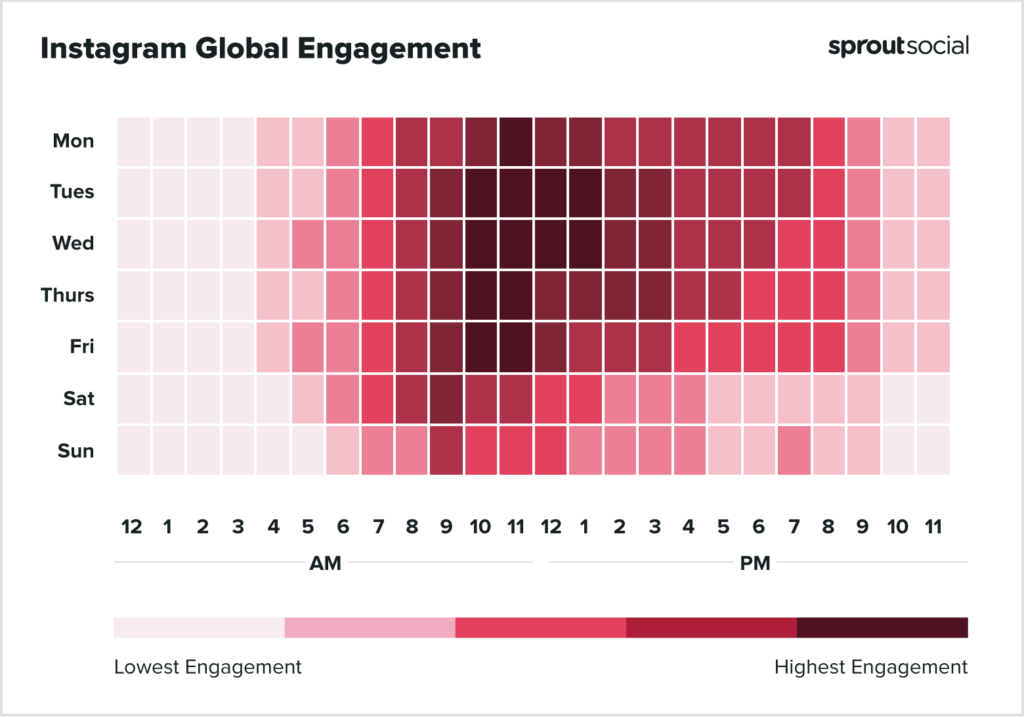
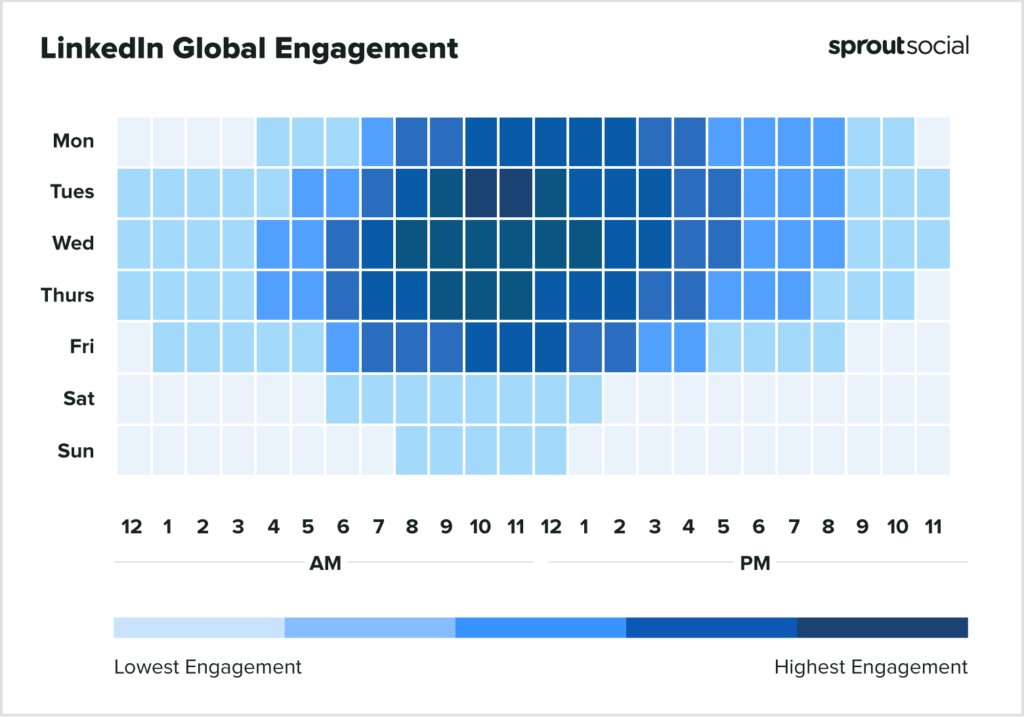
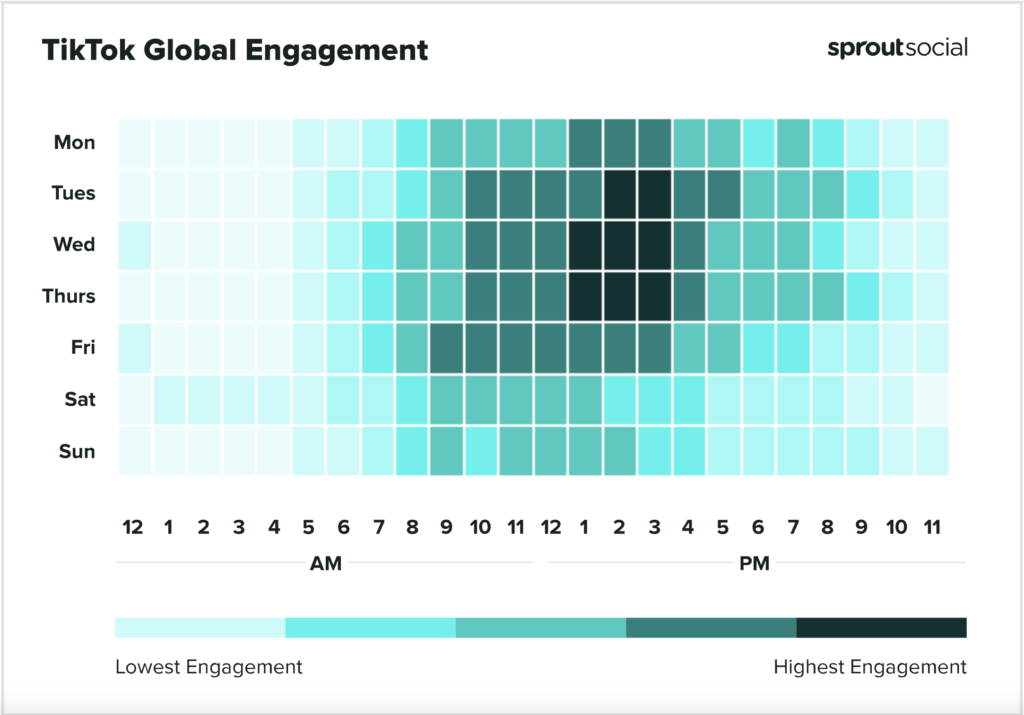
If you want to further your understanding of time in publishing visit this link: SproutSocial
Title, description, thumbnails, and captions

Title
A title is a short and catchy first impression of your video. The main elements of a title are:
- Keywords: use the main keyword that refers to your content.
- Length: no more than 70 characters
- Eye-catching: numbers (“5 top tools”) or emotional words (“amazing strategies”)
- Descriptive: say what your video is about, not a full description but a hook.
Description
A description is a short text that describes the content of the video. It helps the viewer understand the content of the video but it should also spike curiosity and interest. Many platforms use SEO techniques to optimize and categorize videos to help users find the right content. Here are some of the main things to consider when writing your description
- Make a diverse list of keywords to use
- Include long-tail keywords (low competition words, very specific)
- Consider why your audience would be interested in your video, and why they want to watch it.
- Start with 150 words of the most important
- Straightforward is OK
- Tag collaborators/credits
- Add a Call To Action (CTA)
- Add hashtags
Thumbnails
Thumbnails are the cover images of your videos, the image that appears before the video is played. Consider the following when creating your thumbnails:
- Image title
- Image description
- Visual identity (series
Captions
Captions are short pieces of text under an image that describes the picture or explains what the people in it are doing or saying. They are important to ensure:
- Accessibility
- Engagement