
Video Planning
Why is planning important?
As you might imagine planning will allow you to have an overview of the process of video production as well as an understanding of what resources you will need to finalize your project. Since video production is quite a laborious endeavor, often productions fail to understand the many things that are needed before starting and complications arise.
Not all video productions are or need the same, it might be the case that you manage to film an event and you didn’t have time to make a plan before, or it might also be that you will create a video that is composed of many different smaller bits of videos or use content created by other people. You might even think that this process of planning is extra work that you don’t need, but imagine doing a series of small videos for fundraising on social media, sure, the videos themselves are small, but if every time you create them you have to do the whole process again and again it will take you a lot more time than if you have a structured plan in place. So, whichever the scenario keeping a plan in mind will prove useful; it will be easier to adapt your strategy based on the conditions that you have. Even when you might think that your project is too small or improvised, planning will provide a structure to work in more efficient ways, and as we always say: practice makes perfect!
Basic needs
In order to create a video we have identified the basic elements you will need to have:
- A camera / a smartphone that can record images in fair enough quality
- A computer where to manage the assets
- A software for editing (free or paid) preferably installed on your computer
- Enough memory (computer & phone)
- Time (!)
After the basic needs are covered, and our core questions from the “Research stage” are completed, we can start planning our video production. Let’s go over some of the things to consider for this stage.
Planning stage
The checklist
ITEM | STATUS | NOTES |
Core questions: What? | (Completed, in progress, delayed) | *any other relevant information |
Core questions: Who? | ||
Core questions: Why? | ||
Visual identity (branding) | ||
Story script | ||
Storyboard | ||
Shooting script | ||
Project Timeline | ||
List of media assets | ||
Budget breakdown |
Before we go into the nitty gritty of scriptwriting, let’s first go over some of the more practical elements of our planning: project timeline, media assets, and budget.
Project Timeline
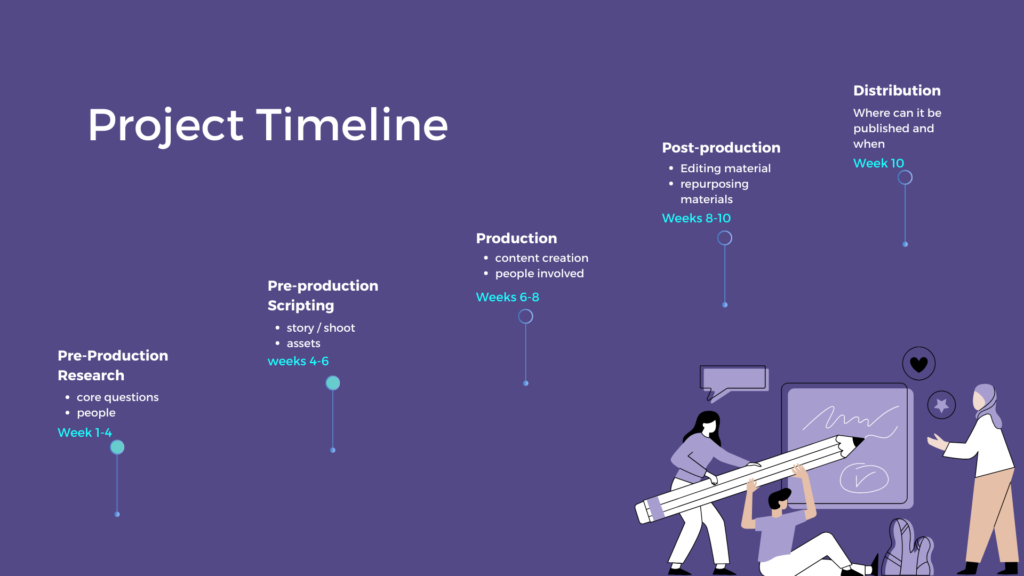
A project timeline is a visual representation of the production process that helps us keep track of the plan. It breaks the production process into stages that clearly show the time each stage is supposed to take, what is the objective of each stage and who are the people involved. This is also a great tool to understand exactly how much time/resources/people a video production takes. This timeline is supposed to be helpful to your process and there are many different approaches to making them, many templates to find online, or even creating your own, but the main thing is that it becomes a useful tool for you and your team to work together in creating videos.
In the case of video production, we recommend splitting the process of production into 3 stages:
- Pre-production (research, planning, scripting)
- Production (content creation)
- Post-production (editing)
Media assets
Assets are the different content types you have created. Having a list of the different assets that you will need for your video will help you keep track of the things you are missing and plan accordingly. This list will depend greatly on the type of video you create but as a basic list we recommend you consider the following:
- Video material (all clips that we will use)
- Images
- Audio (voice-over, dialogues, soundscape, sound effects, music)
- Graphics (titles and animations)
- Text (captions, credits, descriptions)
As you probably imagine it is very important that these elements are updated with each other to keep the coherence of our content: for example, the title of your video should be the same in the captions, descriptions, voice-overs, and graphics.
Another thing to consider is the importance of captions to make your content accessible to all and in general more engaging, for this, it’s important to have as much as possible a script where to go from, and a transcript of the things said on camera.
Budget & resources
Our final practical element to consider during the stage of planning is a budget. Yeah, we know, not necessarily the most fun part of this… but!!! Budgeting is a great way to make sure the process runs smoothly and this will help create a nice atmosphere in the production and hopefully a fun ride!
So, a budget is an estimation of the resources that you will need to complete the project. Budgeting is not only about money, although money is how we understand the costs of production. Even if the project is small it’s important to make a budget to understand exactly how much time/resources/money/people/talent/material goes into the production of a project. Some of the things to consider within a budget are:
- Equipment needed (think hardware: cameras, computers, lights, recorders, microphones)
- Software needed (editing programs, licenses for stock materials)
- People needed (think the different people involved in the creative process) – their hourly rate
- Time of each person dedicated to completing the tasks
- Locations (if you need to rent a space to shoot for example)
- Food & transport
As always there are tons of templates for budgets, take a google dive and explore what might accommodate best the needs of your project.
Pro tip!
Office and Google both have great templates for project timelines and budgets.