
Video essentials: recording video

Now that you have the basics of photography in place, let’s address our main challenge of the session: recording video. Although the elements we just went through are important –they are the basis for composing images that are powerful–, video is a different medium that requires extra consideration. We will see the main characteristics and technical specifications you need to consider when recording video.
Characteristics of a video
When creating a video there are a few things you need to consider:
- Format: is the way in which the content is presented, we saw this on day 4 of last week (creative formats)
- Content: what the video is about
- Assets: are the building blocks that comprise the totality of video content. For example video, images & photos, graphics, animations, audio & sound effects, music, visual effects, captions, titles, and text. It’s important to notice that these assets can be rearranged depending on the format of the video.
- Audience: as we saw on day one of this course, target audience mapping is essential to creating content, it will determine the type of content, the content itself, the tone of voice, and the channels of distribution
- Length: the duration of the video. This choice will depend on the platform where you want to share your content, it is not the same thing to share a video on Instagram (where the users have a watching time of 10 seconds to 3 minutes) than YouTube where videos length can go from 5 minutes to an hour.
Another thing to consider in relation to the above is how different audiences behave on different platforms. Research shows that engagement (in relation to how much time people actually watch videos) in media platforms is as follows:
- Instagram: 30 seconds
- Twitter: 45 seconds
- Facebook: 1 minute
- Youtube: 2 minutes
This does not mean you should not do content that is longer than this but keep in mind how the way we watch things, the time we pay attention, and how quickly we go from one piece of content to another, this is very important if you want to catch your audience’s attention effectively!
Assets
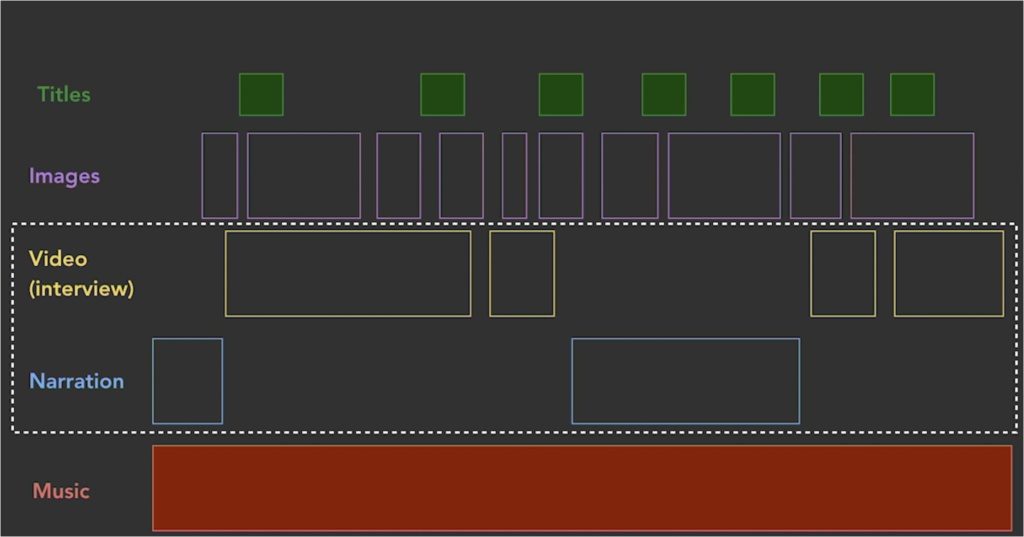
Here the selected section is the core of the video, the central element is the story, and the rest of the elements like music, images, and titles are there to give the tone and the style of the video which can change depending on the audience, the platform or the intention we have. Having this in mind when scripting and recording will ensure that you arrive at the editing stage with all the materials that you need!
Technical considerations
In general, now it is quite easy to go about video production without deep knowledge of technical specificities. However, it is always better to fully understand what each term means in order to know better how to use it. So let’s go over some of the basic technical specificities that you should know:
Video resolution
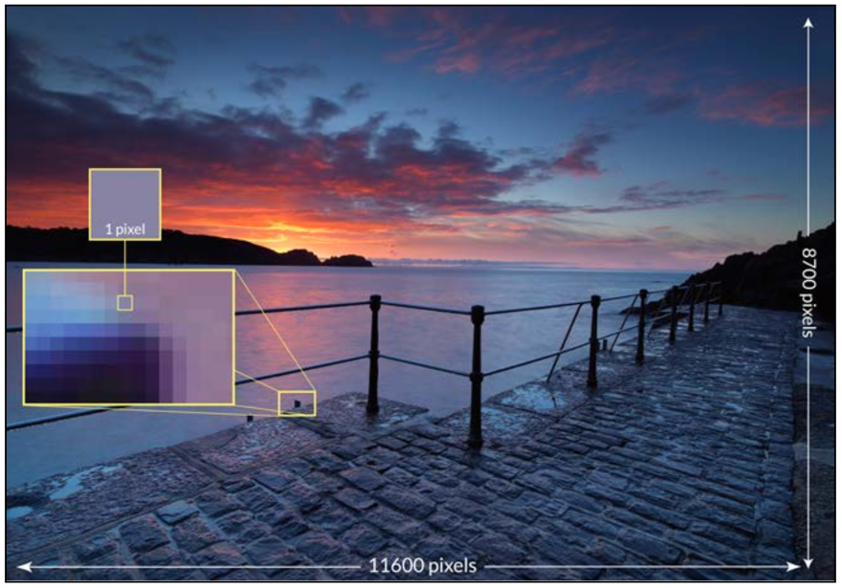
Video resolution is the measurement of the dimensions of a video: pixels wide x pixels high. If you would like to know more about pixels, here is a definition of them and more information about them in relation to photography.
Aspect Ratio
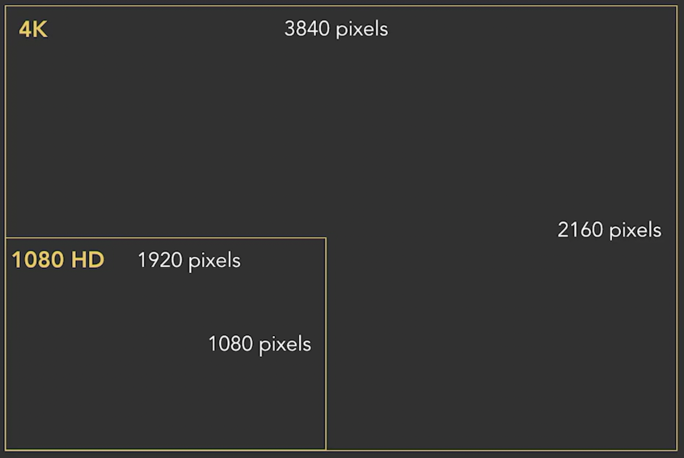
The shape of the video frame, usually presented as ratio, relates to the width and height of the video and the relation between the two. In this case, for example, both 4K and HD have an aspect ratio of 16:9. We can get to this number simply by dividing the length by the height: 3840/2160= 1.777778 = 16:9.

Here are different variations of aspect ratio that you might recognise.
Quick tip! It is always easier to record in high-quality resolution and then in the editing process modify the aspect ratio. This technique is known as video repurposing, where the same content can be modified to be presented in the format that each platform requires.
Files.what?
The file size is the measurement of space a file takes up on a storage medium, such as a computer hard drive or ad server. File size can be measured in bytes (B), kilobytes (KB), megabytes (MB), gigabytes (GB), terabytes (TB), and more. Beyond considering the most practical aspect of this which is memory capacity (both your camera and your computer) each media platform usually has also limitations when it comes to size, you can. Here is a link to more detailed information on file sizes.
The final thing to talk about in this section has to do with technical formats. Do not confuse this with our approach to creative formats, that we saw on our CORE THEORY! The technical format is the type of file in which the video is exported. Some of the most common technical formats for video are:
- .mov
- .mp4
- .avi
- H.264 (MPEG-4)
There are many things to learn about technical formats, if you are interested here is a more detailed approach to it. For now, it’s important to know that the most compatible technical format and the one that manages the best quality with the lowest file size is H.264.