Verification

Why should you do verification?
Verification is the process of making sure your content is accurate. It is easy to get caught up in the moment during a breaking news event. Crises can make it challenging for journalists to keep their cool. You stumble across some great content and you think you might be first because nobody else has run it yet. But in the haste, you forget some of the golden rules. This can lead to making mistakes and, once that happens, a potentially great piece loses all credibility.
The process of verification
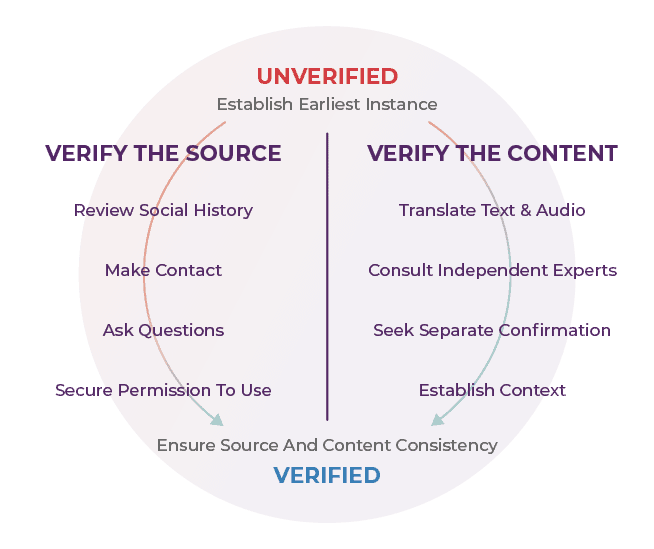
Verify the source:
- Review social history
- Make contact
- Ask questions
- Secure permission to use
- Ensure source and content consistency
Verify the content:
- Translate text and audio
- Consult independent experts
- Seek separate confirmation
- Establish context
- Ensure source and content consistency
Why should you do verification?
Algorithms + Advertising + Exposure
Remember how videos and messages go viral? It is a combination of algorithms In the first hour, it is due to algorithms. The more clicks a piece of content gets, the more it spreads.
Your brain also works differently depending on how you feel. This influences the impact that information can have on you.
Normal Brain
The function of the normal brain is to collect balanced input. It absorbs information from a range of sources, and creates a balanced understanding as well as healthy emotional responses.

Crisis Brain
When we feel at risk, our brains are triggered and thus we have a fight, flight, or freeze response.
This leads to tunnel thinking.
It is therefore crucial to check, check, and check.
The process of verification
- Origin: Where did the article or piece of content originate from? Is this the original?
- Source: Who wrote or created the original content?
- Date: When was it written or created?
- Location: What website or account was the content published on originally?
- Motivation: Why did the website or account choose to publish the content?
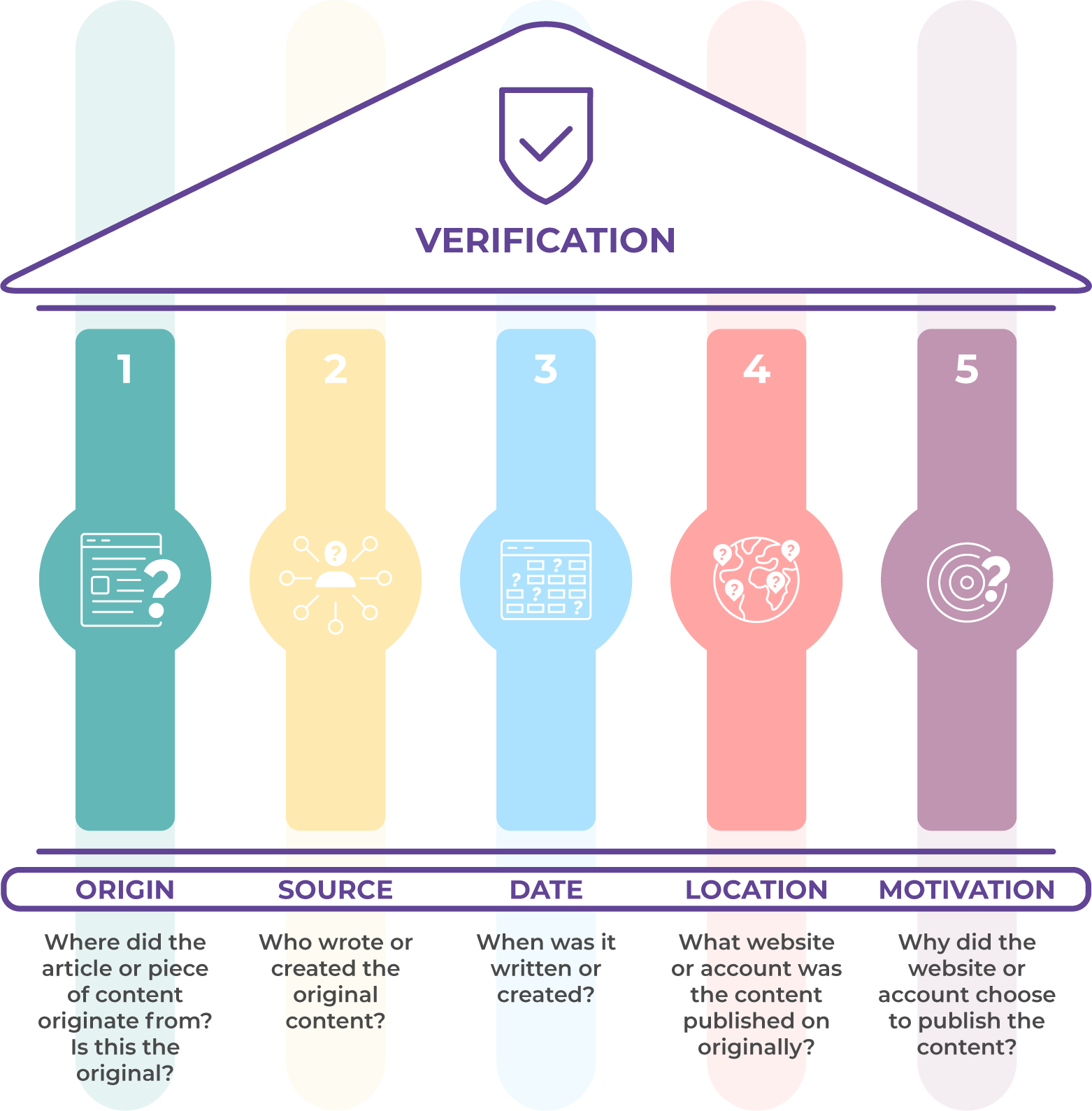
For a summary of the 5 pillars of verification, you can watch the video below:
All of these questions should help you judge how to deal with the information.
Verifying Images
Ten tips to ask yourself when fact-checking photos:
- Can you find when the picture was first used?
- What is the context the picture was used in?
- Who is in the picture? Do they fit in? What clothes are they wearing? Is it the right style for the country the picture was allegedly taken in?
- What is the weather like in the photo? If the photo is recent, is it the right season for that country?
- Look at any writing in the photo, like road signs and shopfronts. Is it in the correct language?
- Check for inconsistent lighting or slight variations in light or colour in the photo. If some objects seem brighter or duller than others, there is a chance they could have been added or digitally manipulated.
- If there are distortions along the edges of people or objects, the picture has probably been poorly manipulated.
- Check, check and check again, before you tweet or post.
- If someone posts something that is old or “fake”, politely let them know.
- Be part of the solution! Follow these tips so you do not contribute to “fake” news.
Geolocation for images and videos: a 7-step process
- Find the original: For the best, and most credible, verification you want the oldest or original posting. Try and use reverse image searching or text searching on Google, Facebook, YouTube, Twitter, and other open sources to find the original.
- Source Analysis: Evaluate the original poster’s credibility. Ask yourself: Where are they posting from? When are they posting? Who is following them? Who are they engaging with online?
- Gather Leads: Find any information in the caption or reposts of the media mentioning the location where the video was recorded or what it is showing.
- Identify landmarks: Look for buildings, fields, trees, roads, or anything else you could potentially see from satellite imagery.
- Visual comparison and Analysis: Compare your identified landmarks with what is shown on satellite imagery. If stuck do more discovery
- If you can’t locate the video, try searching for more images or videos that show that location or the surrounding areas.
- Visualize & document your findings: Use tools such as Keynote, Google Draw, and ones provided by Knightlab to present your findings.
Other things to look for:
- License/number plates on vehicles
- Weather conditions
- Type of clothing
- Signage/lettering
- Is there an identifiable shop or building?
- What is the type of terrain/environment in the shot?
Verification tools
Tools for Verifying Images
Tools for Verifying sources
Tools for Verifying Video
- YouTube Data Viewer
- InVID Toolbox (for Google Chrome):
The InVID toolbox “allows you to quickly get contextual information on Facebook and Twitter images and videos, as well as on Youtube videos, to perform reverse image search on several engines, to query the new Database of Known Fakes (DBKF), to fragment videos from various platforms (Facebook, Instagram, Youtube, Twitter, Daily Motion) into keyframes, to enhance and explore keyframes and images through a magnifying lens, to query Twitter more efficiently through time intervals and through a new Social Network Analysis module, to read video and image metadata, to check the video copyrights, to quickly search for fact checks or cross-network queries, and to apply a new enhanced forensic toolbox on images suspected of being manipulated. Another new forensic module, CheckGIF made in the EnVisu4 IFCN project, allows you to create a GIF between a manipulated image and an original one to better reveal the manipulation.” Privacy note: the team who maintains the toolbox claim no personal data is being recorded. However, Google Analytics is used to understand usage. It is possible to opt out from this by un-checking the Google Analytics checkbox located on the ‘About’ page.
Tools for Verifying Content/News