Phase 2: Iterative Design
This phase begins with the Kick-Off Meeting, an initial collaborative brainstorming session to establish the solutions’ approach, objectives and general structure. After the Kick-Off Meeting, you will continue co-creating the learning solution with the relevant expert(s). The iterative design process means you will be rotating through the design, prototype, and review phases until the instructional design is ready to move to the development phase.
1. Host a Kick-Off Meeting
The Kick-Off Meeting is useful for aligning perspectives between internal and external stakeholders regarding the learning solution. The concrete aim of the meeting is to define the general learning objectives and the key contents that need to be addressed. If time allows, you can also brainstorm or decide on the assignments, certain activities or resources to be shared.
The kick-off meeting is planned to last 2 hours. Make sure to invite all relevant stakeholders, such as the subject matter expert(s), learning experience coordinator, solution owner(s) of any connected solution(s), the project lead, etc. You can also announce the meeting during the stand-up, and send invites to colleagues who express interest to participate.
TO DO: With the information gathered, complete the Capacity Statements and Content sections of the Learning Solutions Co-Creation Template. You can also show the template during the meeting and complete it live with the attendees. If you agreed on other aspects, make sure to record it as well.
2. Set a Development Timeline
Now that you have more information about the learning solution, create an estimated timeline. Consider your personal capacity, the deadlines of the project, and some buffer time. We have created estimations of the time that a learning designer invests in the design and development of a learning solution. Use these as a reference, as every project will be different and we are working on increasing their accuracy:
Task | 8h of instruction (1 day) | 24h of instruction (3 days) | 40h of instruction (5 days) |
|---|---|---|---|
Create a New Learning Solution | 30h of work | 74h of work | 114h of work |
Revamp* a Learning Solution | 24h of work | 54h of work | 86h of work |
In some cases, you will need to consider additional time between the end of the learning design process and the implementation date:
TO DO: Once you have set your development timeline, update it in the Learning Design environment in Zoho Projects.
3. Hold meetings with the SME
Use the Learning Solutions Co-Creation Template to guide your meetings. Together, plan the specific learning objectives, activities and assignments. Before closing the meeting, agree on next steps:
- Which materials does the SME need to send? (E.g. case studies, theory, links to a website, etc.)
- When will you create the session plan?
- When does the SME need to review the session plan?
- When will be your next meeting? (If needed)
4. Present a design prototype in the Learning Design Workshop
When you have a solid idea of the learning objectives, content, activities and assignments, book a Learning Design Workshop slot to present your design prototype. The prototype can be in any format that helps you explain the vision for the learning solution. For instance, you could use the Learning Design, Co-Creation Template, the Session Plan Template, or the MURAL template.
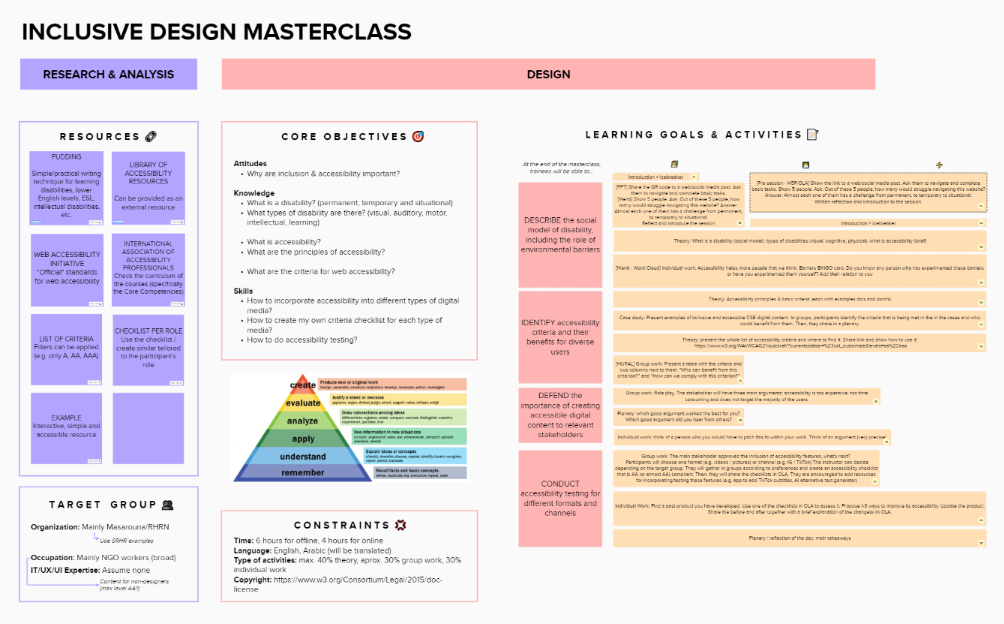
During the workshop, you will receive feedback from your Learning Design colleagues. Before presenting your design, make sure to ask your colleagues to focus on any specific parts that you would like to discuss (e.g. one activity that you are unsure of, the general flow of the day, etc.).
After the workshop, incorporate the relevant suggestions. As product owner, you make the final decisions about the learning solution.
The Learning Design Lead will let you know as soon as possible if you have the green light to move forward with the iterative development phase.
TO DO: Register your learning solution in the Solutions Registry in Zoho CRM. You can either create a new solution or update an older version. After this phase, you should be able to complete all the fields in the ”General Information”, ”Solution Specifics”, and ”Solution Development Timeline” sections.