Editing: folders & importing media
Folders
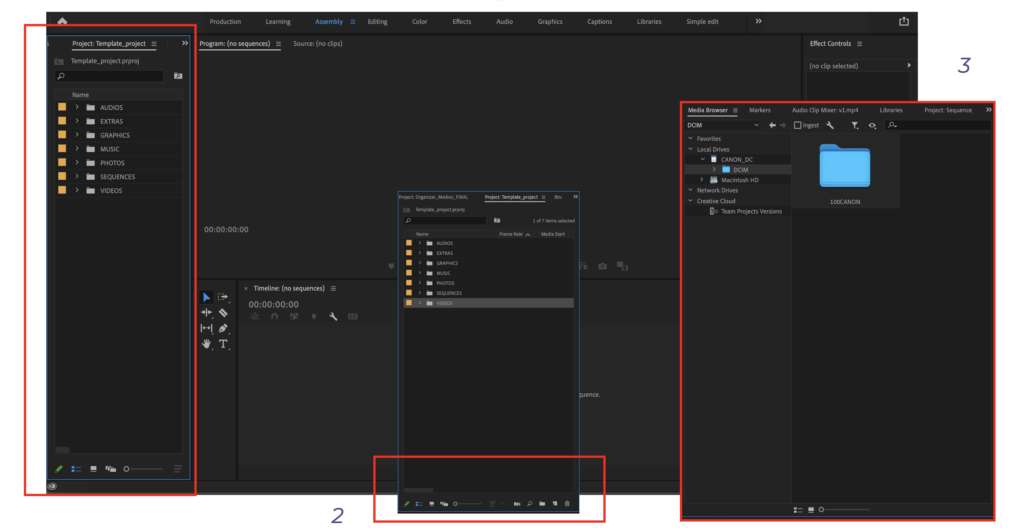
Within most editing software programs, there is no such thing as a folder template, as part of your course you have received a file (.proj) which is a template for folder structure. We highly recommend you keep this or your own (but similar) folder structure; it will help you keep organized! It is also possible to organize your files outside of the program, in your computer files, and import complete folders. You can also later import individual files into the folders you have imported to the program. Just as a reminder, the structure we suggest goes as follows:
- Videos
- Audios (voice-overs & sound effects)
- Music
- Photos
- Sequences
- Extras
- Graphics (captions & titles)
Create the folder structure that works best for you but this type of structure might help you in locating files quicker and also have a clearer overview of the assets you have.
Folders can also be created after the materials are imported, in the bottom of the left panel you can click on the icon of FOLDER and it will automatically open a new folder. After doing that you can click on each folder and import media directly to that folder.
Importing media
Import vs Ingest
It might come in handy to know the differences between ‘importing’ media and ‘ingesting’ since these 2 actions can render very different results:
- IMPORT: importing media is mainly making a reference to an existing media in the hard drive of the computer (or an external hard drive) this is often how media is imported.
- INGEST: is used whenever you want to bring media directly from an external source, like an SD card. This process ensures that the material imported is first copied from the external source to your drive and that the settings/properties of the original material are properly cared for (better to do this than to first import to files and then to Premiere)
Pro tip!
Bringing all the files you have created can become overwhelming, do not panic! Here is where organizing your files in folders can help you have a clear order. Also, don’t forget to have your planning close to you, you had made a plan before of how you envisioned this content to take form so having it close can serve as a guide for the editing process. In general, the better you follow your pre-production plan the easier the editing part becomes!